
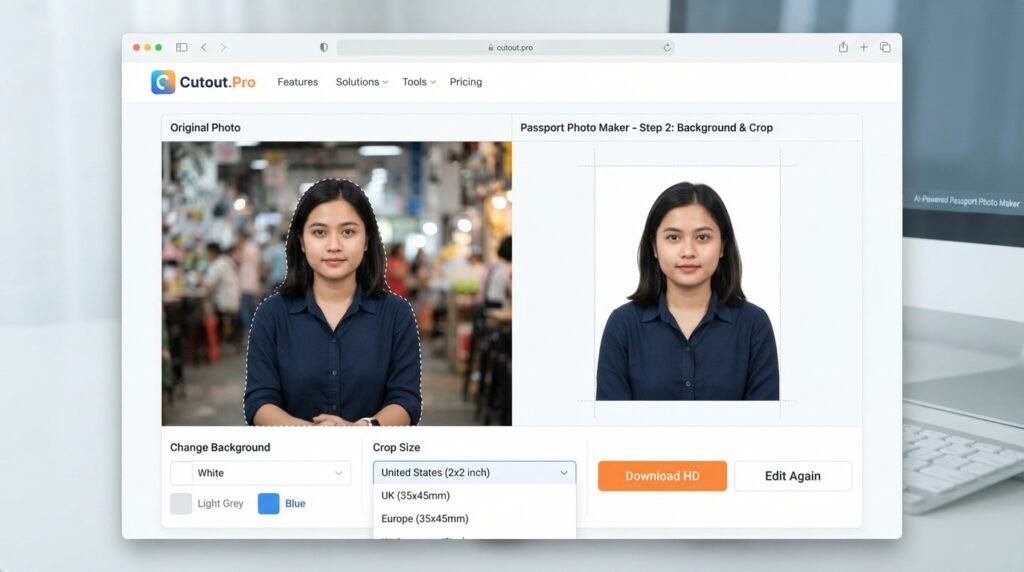

Getting a passport photo used to mean visiting a photo studio, waiting in line, and paying more than expected. Today, AI-powered tools have completely changed the process. One of the most popular solutions is Cutout Pro Passport Photo Maker, an online tool that helps users create passport, visa, and ID photos within minutes.
Whether you’re applying for a passport, renewing visa, or preparing an ID card photo, this smart online platform simplifies the entire process. With automatic background removal, photo reizing, and compliance with official country requirements, it saves both time and money.
“A professional passport photo no longer requires a professional studio—AI can deliver accurate results from the comfort of your home.”
What Is Cutout Pro Passport Photo Maker?
Cutout Pro Passport Photo Maker is an AI-powered online application that automatically creates passport and ID photos that meet official standards. Instead of manually editing images, the software detects your face, removes the background, adjusts lighting, and resizes the image according to your selected country’s requirements.
The platform supports passport photos for dozens of countries, making it suitable for travelers, students, professionals, and families. Its intelligent technology ensures that the final image follows official specifications without requiring advanced editing skills.
Why Choose Cutout Pro Passport Photo Maker?
Creating passport photos at home has become much easier thanks to artificial intelligence. Cutout Pro Passport Photo Maker provides a fast workflow that minimizes editing time while producing professional-quality results.
Unlike traditional editing software, the platform automates almost every step. Users simply upload a clear photo, select the document type, and allow the AI to prepare a compliant passport image.
Key Benefits
| Feature | Benefit |
|---|---|
| AI Background Removal | Automatically replaces the background with white or required color |
| Face Detction | Centers the face according to passport rules |
| Country Templates | Supports passport sizes for multiple countries |
| High Resolution | Produces print-quality images |
| Easy Interface | Suitable for beginners |
| Fast Processing | Creates passport photos within minutes |
How Cutout Pro Passport Photo Maker Works
Using Cutout Pro Passport Photo Maker is simple enough for anyone. The website is designed with a clean interface that guides users through every stage of the process.
After uploading a clear selfie or portrait, the AI scans the image, detects facial features, removes unwanted backgrounds, and generates a passport-ready version. Users can preview the result before downloading the final image.
The platform also adjusts image dimensions and head positioning to improve compliance with government standards.
Top Features of Cutout Pro Passport Photo Maker
One reason many users prefer Cutout Pro Passport Photo Maker is its impressive collection of AI-powered editing tools. These features help create passport photos that look professional while meeting official requirements.
Some of the standout features include automatic croping, facial alignment, brightness correction, background replacement, and multiple export options. The tool also works directly from a web browser without requiring software installation.
Popular Features
| Feature | Description |
|---|---|
| AI Crop | Automatically crops to passport size |
| Background Editor | Removes distracting backgrounds instantly |
| Photo Enhancement | Improves lighting and image clarity |
| Facial Alignment | Places the face correctly |
| Multiple Country Support | Uses official pasport dimensions |
| Instant Download | Saves printable high-quality images |
Benefits of Using Cutout Pro Passport Photo Maker
Many people choose Cutout Pro Passport Photo Maker because it reduces costs associated with professional photography services. Instead of scheduling appointments, users can complete everything from home.
Another advantage is convenience. Whether applying for passports, visas, driver’s licenses, or employee ID cards, the platform produces suitable images quickly while maintaining excllent quality.
The AI also minimizes common mistakes such as incorrect head positioning, uneven backgrounds, or poor image sizing.
Tips for Getting the Best Passport Photo
Although Cutout Pro Passport Photo Maker handles most editing automatically, starting with a high-quality image always produces better results.
Choose a well-lit room with natural lighting whenever possible. Wear clothing that contrasts with a white background, avoid heavy shadows, and maintain a neutral facial expression. Looking directly into the camera helps the AI create the most accurate passport photo.
Keeping the camera steady and using a modern smartphone can also improve image quality significantly.
“Good lighting combined with AI editing creates passport photos that look both natural and professional.”
Who Can Use Cutout Pro Passport Photo Maker?
One of the biggest strengths of Cutout Pro Passport Photo Maker is its versatility. It serves individuals, families, students, freelancers, travelers, and businesses alike.
Parents can quickly prepare passport photos for children, while professionals can create ID photos for work badges and official documents. Educational institutions and organizations may also find the platform useful for producing standardized identification photos.
Because the software works online, users only need an internet connection and a clear photograph.
Related Keywords
Using related keywords naturally improves SEO while helping readers discover additional information.
| Primary Keyword | Related Keywords |
|---|---|
| Cutout Pro Passport Photo Maker | AI passport photo maker |
| Cutout Pro Passport Photo Maker | Online passport photo editor |
| Cutout Pro Passport Photo Maker | Passport photo creator |
| Cutout Pro Passport Photo Maker | AI ID photo maker |
| Cutout Pro Passport Photo Maker | Visa photo generator |
| Cutout Pro Passport Photo Maker | Background remover for passport photo |
| Cutout Pro Passport Photo Maker | Passport photo online |
Is Cutout Pro Passport Photo Maker Worth It?
For users looking for convenience, speed, and affordability, Cutout Pro Passport Photo Maker is an excellent choice. Instead of relying on complicated editing software, users receive AI-assisted results within minutes.
Its combination of intelligent editing, multiple country templates, and high-resolution downloads makes it suitable for both personal and professional use. While it’s always important to verify local government requirements before submitting any passport application, the platform significantly reduces the effort required to prepare compliant photos.
Frequently Asked Questions
What is Cutout Pro Passport Photo Maker?
Cutout Pro Passport Photo Maker is an AI-powered online tool that creates passport, visa, and ID photos. It automatically removes backgrounds, resizes images, and adjusts facial positioning according to official document requirements.
Does Cutout Pro Passport Photo Maker remove the background automatically?
Yes. One of the main features of Cutout Pro Passport Photo Maker is AI-powered background removal. The software replaces the original background with clean white or required background in just a few seconds.
Can I use Cutout Pro Passport Photo Maker on my phone?
Absolutely. Cutout Pro Passport Photo Maker works on smartphones, tablets, and desktop computers through a web browser, allowing users to create passport photos from virtually anywhere.
Is Cutout Pro Passport Photo Maker suitable for visa and ID photos?
Yes. Besides passport photos, Cutout Pro Passport Photo Maker can also generate images for visas, employee badges, student IDs, driver’s licenses, and other official identifiction documents.
Conclusion
Cutout Pro Passport Photo Maker has transformed the way people create passport and ID photos by combining artificial intelligence with an easy-to-use interface. Instead of visiting a photography studio, users can upload a clear image, let the AI perform automatic edits, and download professional-quality pasport photo within minutes. From background removal and facial alignment to country-specific templtes and high-resolution downloads, the platform offers a practical solution for modern document photography. If you want a fast, affordable, and reliable way to create compliant passport photos online, Cutout Pro Passport Photo Maker is a strong option worth considering.